QR Code Guides
How Many Times Can a QR Code Be Scanned?
Short answer: a QR code itself has no built-in scan limit — the pattern doesn't wear out, expire, or "use up" scans the way a coupon does. But the real answer is more nuanced, because some QR codes really do stop working after a certain number of scans, and it has nothing to do with the code pattern itself. Here's exactly what's going on.
The Quick Answer
A QR code is just a visual pattern that encodes data — a link, text, WiFi credentials, whatever you put into it. Scanning it is a purely passive, read-only action, like reading a word printed on a page. Reading a word 10,000 times doesn't erase the page, and scanning a QR code 10,000 times doesn't erase the code. There is no technical mechanism in the QR code standard itself that limits or counts scans.
So if a QR code "stops working" after a certain number of scans, the limit was added by whatever service generated the code — not by the code itself.
Static vs. Dynamic QR Codes: The Key Difference
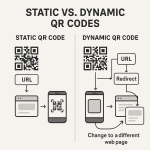
This is where the confusion usually comes from. There are two fundamentally different types of QR code:
| Type | How It Works | Scan Limit? |
|---|---|---|
| Static QR Code | Your destination link is encoded directly into the pattern itself. There's no server in the middle. | Never. Scans forever, for free, with no account or subscription involved. |
| Dynamic QR Code | The code points to a short redirect URL owned by the generator's platform, which then forwards the scanner to your real destination. | Sometimes. Many generators cap free-plan redirects (e.g. 50–10,000 scans/month) to push you toward a paid subscription. |
Dynamic codes are genuinely useful — they let you change the destination link after the code is printed, and they usually include scan analytics. But that convenience runs through the generator's server, which is exactly where "scan limits" and "subscribe to keep scanning" messages come from. It's a business model decision, not a QR code limitation. We cover the full trade-off in Can I Change the Link of a Static QR Code After Printing? (The Dynamic Truth).
Why Some QR Codes Seem to "Run Out"
If you've seen a QR code stop working after a period of heavy use, it's almost always one of these:
- Free-tier redirect caps. The generator's dynamic-code service hit its monthly scan allowance and paused redirects until you upgrade or the billing cycle resets.
- The destination was taken down. The code still scans fine and reads the same data — but the website, form, or page it points to no longer exists.
- A trial or campaign account expired. Some marketing platforms disable dynamic codes entirely once a trial period ends, regardless of scan count.
- The code was intentionally single-use. Some systems (event check-ins, one-time coupons, single-use payment links) are deliberately built so the linked system only honors the first scan — the QR code itself still scans fine, but the server rejects repeat requests.
In every one of these cases, the QR pattern is unaffected — it's the service behind it that stopped responding.
What Actually Stops a QR Code From Scanning
Since scan count isn't the real risk, here's what actually causes a QR code to fail — all physical or design issues, not usage limits:
- Physical damage — creases, tears, fading, or heavy dirt covering key parts of the pattern
- Poor print quality — a low-resolution or blurry export makes the modules impossible for a camera to distinguish
- Insufficient quiet zone — no clear white border around the code confuses the scanner
- Oversized logo with low error correction — covering too much of the pattern without enough backup data
- Broken destination link — the code scans perfectly but the URL it points to returns a 404
If your code has scanned fine for months and suddenly stops, check the physical copy first (is it creased, faded, or dirty?), then check the destination link. Scan count is very rarely the actual cause.
How to Make Sure Your QR Code Never Stops Working
The most reliable approach for something you plan to print and reuse indefinitely — a menu, a business card, a poster — is a static QR code with no third-party redirect involved:
- Your link is embedded directly in the code, so there's no server to hit a limit or shut down
- It works exactly the same on scan #1 and scan #1,000,000
- Nothing to renew, no account required, no risk of a service disabling your code later
The trade-off is that a static code can't be redirected to a new URL later — if you need to update the destination after printing, that's the one legitimate reason to choose dynamic instead. For a deeper look at that decision, see Are QR Codes Permanent?
Frequently Asked Questions
Do free QR codes have fewer scans than paid ones?
Only for dynamic (redirect-based) QR codes on generators with tiered plans. A static QR code created for free scans exactly the same as one from a paid plan — unlimited, forever — because there's no redirect server involved to meter usage.
Can a QR code expire?
The code pattern itself never expires. What can "expire" is the destination it points to — a dynamic code's redirect service, a landing page that gets taken offline, or a trial account that lapses. The scannable pattern remains readable indefinitely.
Is there a limit to how many different devices can scan the same QR code?
No. Unlimited different phones, tablets, or scanner apps can all scan the same static QR code simultaneously with no conflict, since scanning is a read-only action with no server-side interaction required.
Why does my QR code say "scan limit reached"?
That message comes from a dynamic QR code platform, not the QR code standard itself. It means the generator's free plan capped the number of monthly redirects for that specific code, and you'll need to upgrade or wait for the billing cycle to reset to keep the redirect active.
Do static QR codes really have zero scan limit?
Yes. A static QR code encodes your link directly into the pattern with no server involved, so there is no mechanism to count, cap, or expire scans. It functions the same on the millionth scan as it does on the first.
Create a Free Static QR Code — No Scan Limit, Ever
Our generator creates static QR codes with unlimited scans, no account, and no subscription required. Your link is baked directly into the code — nothing to renew, nothing to expire.
Create Your Free QR Code →Related guides: Are QR Codes Permanent? · Can I Change the Link of a Static QR Code? · QR Code Error Correction Levels Explained · Why Does My Colored QR Code Not Scan?